
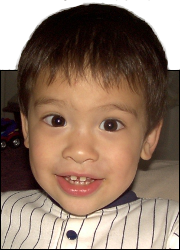
 This is Alpha, the first-born, when he was 2YO.
 This is Beta, the second-born, when he was about 2YO.
 This is Gamma, the third-born, when he was about 18MO.
2FA Text Length
Sep
2
2026
A number of my logins require Two-Factor Authentication, where they email or text me a code to enter in addition to my password.
The accounts that text me are more convenient. I could just glance over at my phone, and the alert would pop up with the sender and the first part of the message, and the message was short enough that the snippet that appeared in the alert had the code, so I could quickly memorize the code without leaving the login page and continue on my merry way.
It also worked well if I happened to be on my laptop – I could glance over at my phone, see the code on the lock-screen alert, and no bother opening anything to continue working on my laptop.
But there was one company that sent longer texts, so I couldn’t read the code from the text alert. I had to open the text to read it. And that was inconvenient and thus annoying.
Then I got to thinking about it, and I realized that one company is the only one that’s actually secure. The other 2FA texts are not. Because if someone steals my phone, they can’t open it and read my texts, but they can read any text alerts that pop up on the lock screen.
I suppose I could change my Messages settings to not show a preview of the text in the alerts, but the main one that matters to me is the one that does it correctly, so I’m not going to bother.
Then you would trust, because there is hope; And you would look around and rest securely.
Job 11:14


This little article thingy was written by Some Guy sometime around 7:40 am and has been carefully placed in the Technical category.