
Archive for the ‘Technical’ Category

Torque and Horsepower

A popular online debate is “what is the difference between torque and horsepower?”

I am here to answer that question. But I’m going to tie it to sports. And I’m just going to summarize it. So if you like discussing power in engineering units and if you appreciate football and if you like short blog posts, this is for you.

Simply put: horsepower wins games, torque wins championships.

That is all.

He will also lift up a standard to the distant nation, And will whistle for it from the ends of the earth; And behold, it will come with speed swiftly.

Isaiah 5:26

I Switched Back to Google

Regular readers of this blog will remember that I switched over to Bing for my default search engine around Thanksgivingtime.

This past weekend, I wanted to cross-check something so I went specifically to Google and searched, and I was surprised to see that they reinstated the feature that had disappeared at Thanksgiving.

So my reason for not using Google does not exist anymore, and it does give better results than Bing. For example, I searched for a football game on Google, and it gave me news articles, video options, relevant items on Twitter, and general information about the upcoming game. I searched for the same thing on Bing, and half of the results looked to be illegal streams of the game.

And they said to her, “No, but we will surely return with you to your people.”

Ruth 1:10

I Switched to Bing

I had Google setup as my default search engine for the Safari browser on my iPhone. I edited the link so that it disabled the autocomplete function, which gave a bunch of search suggestions as you were typing. I did not like that, mainly because my kids will use my phone from time to time and some of the suggestions were inappropriate. Plus I felt it was distracting and contributes to ADHD.

It was easy enough to disable – just add a string of “complete=0” to the URL and you’re good to go, just a plain search engine with no too-eager-to-please additional help popups. See my previous blog post on the topic of disabling Google autocomplete for details.

But Google changed something on Thanksgiving. I looked up something and noticed that Google was throwing possible search terms at me. “Is this what you meant to type?” “Maybe this?” “Look, a lot of people are searching for these words, would they interest you?”

No, Google, I am not interested in what other people are looking up. If I were interested, I would search for that.

At first I thought I opened the plain Google URL. So I made sure to use the special link. But no, the special link didn’t do anything anymore.

I poked around on the internet, but there were no suggestions. Changing the settings using the link at the bottom of Google didn’t do anything either.

I figured I might as well try Bing. Alas, Bing also wanted to tell me what other people liked searching for.

Lo and behold though, the Bing settings let me disable that. And it worked. I have set my default search engine on my iPhone to Bing.

Now when my kids want to look something up, I do not have to worry about hearing a question along the lines of “Dad, what does such-and-such mean?” Or even worse, not getting asked that question and having them click the Google suggestion.

I’m not a fan of Microsoft products, but I will gladly use Bing since it’s behaving like I want my search engine to behave.

Now a word was brought to me stealthily, And my ear received a whisper of it.

Job 4:12

Garbled Mess

With my hobby of tracking NFL scores (or at least wins and losses), I check the results of NFL games to update my data. The easiest way to do that is to get the scores. A lot more places have scores available than a simple W or L for the day.

I figured the best place to get the NFL scores is the NFL website. And a convenient device for me to use is my iPhone. It’s not the latest one, but there are still millions of them in use, so it’s fairly relevant.

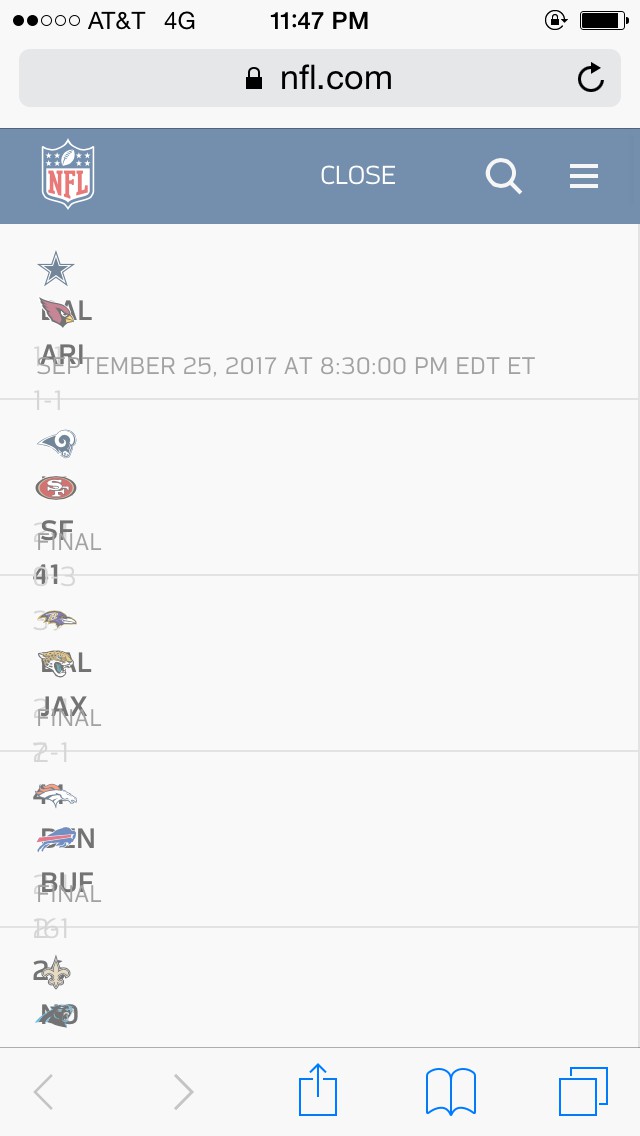
I went to the NFL website, clicked on the Scores link at the top, and this is what I saw (yes, it was fully loaded and rendered):

image of scores being jumbled together on the NFL website

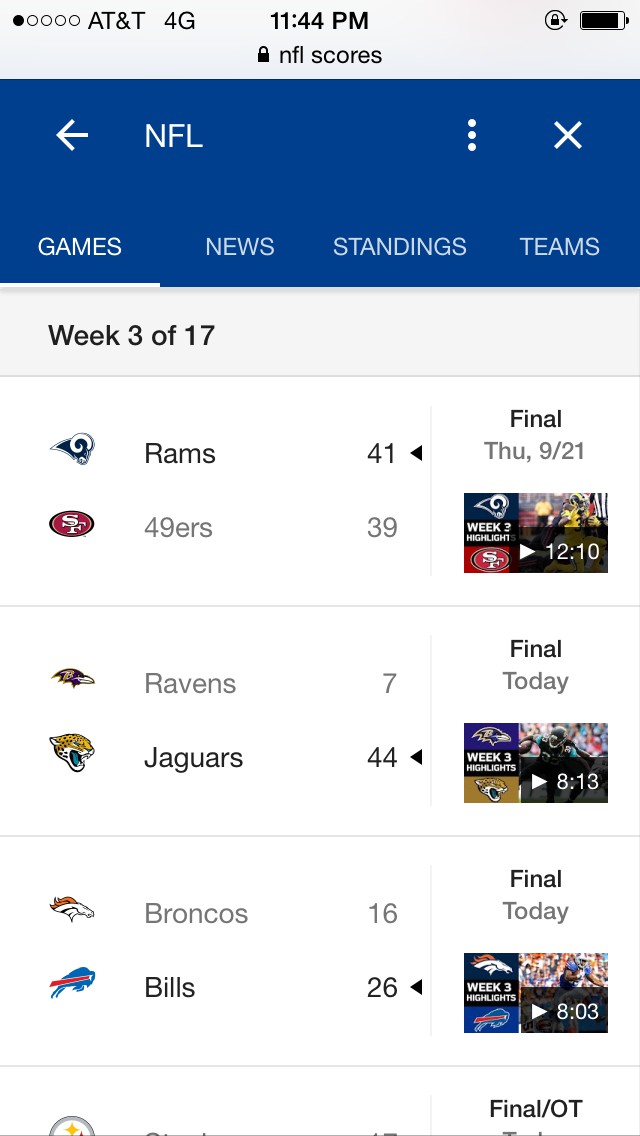
The NFL website was done so poorly that I couldn’t decipher the jumble of letters and numbers. Compare that to Google:

image of scores being displayed nicely on Google

Much better.

You’d think the NFL would check that their website rendered properly in Safari on an iPhone, but apparently they did not. I’m going to blame their website redesign that’s new since last season. There is a lot about it that I don’t like, but rather than go into all the details, I’ll just stick with this one example.

Every prudent man acts with knowledge, But a fool displays folly.

Proverbs 13:16

Missing Links

Our younger students still bring home flyers for stuff, but our older students don’t. It’s not that they forget the flyers, rather the non-elementary schools don’t hand out papers. We get emails and such. The day before picture day, I asked the boys about picture ordering information since I hadn’t received an email. “I think it’s on the website or something.” was the answer I got.

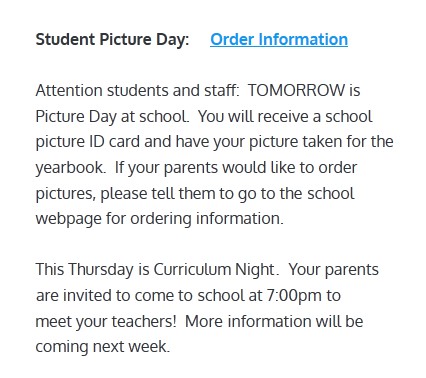
So I went to the school website. Here’s a snippet of that page.

image of school picture day announcement

If you notice the top part of the announcement, it has a link to Order Information. I clicked that link, expecting it to take me to the studio’s website or something.

It took me to a PDF of the flyer.

That PDF, naturally, had the studio’s website address printed on it. But it wasn’t clickable.

So I had to type in the URL that was on the PDF. First-world problems, I know. I just found it amusing that in this day and age, people aren’t thinking of providing links directly to active content. Links have been around for over 20 years now. It should be the first thought of the website person. I don’t know who runs the school website – maybe it’s a teacher or administrative person who got saddled with that task and is doing the best he can. That’s why I didn’t complain to the school. I simply provided it here for the entire internet to see.

I suppose that since it was originally on the school website, the whole internet could have already seen it. In that case, I provide it here to serve as a lesson for all you web developers: if you create a link to a static document or image, and that document or image has a website or other such link printed on it, you can make everyone else’s day a little easier and brighter by providing a clickable link to that content. Allow people to bypass the middleman.

A scoffer seeks wisdom and finds none, But knowledge is easy to one who has understanding.

Proverbs 14:6

Setting the Furnace Back

Even though it’s still August, it is starting to feel like fall. So people’s thoughts are turning to furnaces and heating the house.

I overheard someone denouncing the practice of setting the thermostat to a lower setting during the times when the house is unoccupied for a while. His argument was that sure, the furnace won’t run while the house cools down, but then it works extra to heat the house back up and all that savings is lost.

That is true if the time is short enough such that the house won’t stay at the lower temperature very long. The savings come with time at the lower temperature.

The reason for this is that the rate of heat transfer increases with a higher temperature difference. In other words, the warmer the inside of the house is, the more heat it will lose to the colder outside. Thus, the more heat the furnace will have to add to the inside.

So if you keep your house a little cooler, then not as much heat will escape, so you’ll see slight savings in furnace fuel costs. Think about what would happen if you set your thermostat to match the outside temperature: the furnace wouldn’t run at all. And your fuel costs would be zero. It’s just a linear ramp up from there: the higher the difference between your thermostat and the outside, the more the furnace will run. The times when the house is changing temperature is a wash – they cancel out.

Now the slaves and the officers were standing there, having made a charcoal fire, for it was cold and they were warming themselves; and Peter was also with them, standing and warming himself.

John 18:18

Printing Maps

Printing with Google Maps used to be easy. That was many moons ago. I’m thinking it was the original Google Maps website. There used to be a Print button on Google’s webpage. It would bring up a print preview-type box, and you could scroll and zoom the map in that to make sure your map printed just how you wanted.

Fast forward a few years from there, and Google “updated” their maps service so that it didn’t print anymore. If you wanted to print, you had to use your browser’s Print Webpage function. No longer could you make the map preview match what you wanted. No longer was it convenient to print different sections of a route. But, someone thought it was progress, so that’s what we got.

Fast forward a few more years, and Google “updated” their maps service to include more bloat features. That’s where we are now.

My problem now is that Google Maps won’t even print. I press ctrl-P to invoke the browser’s print feature, and it sends it to the printer, but the printer doesn’t like it.

Why does every improvement make my life harder?

Do not fear, though, for I have found the solution.

Option 1: MapQuest. Yes, that site is still functional. And it plays nicely with the printer.

Option 2: Switch Google Maps to Lite Mode. Click the lightning bolt in the lower right corner of the website. Once I switched to Lite Mode, I magically had no problems printing.

Your mileage may vary, but if you’re having problems with some aspect of Google Maps, try Lite Mode. Now if I could just get them to add a button so I could switch to Original Mode, it’d be perfect.

Thus says the Lord, “Stand by the ways and see and ask for the ancient paths, Where the good way is, and walk in it; And you will find rest for your souls. But they said, ‘We will not walk in it.’ “

Jeremiah 6:16